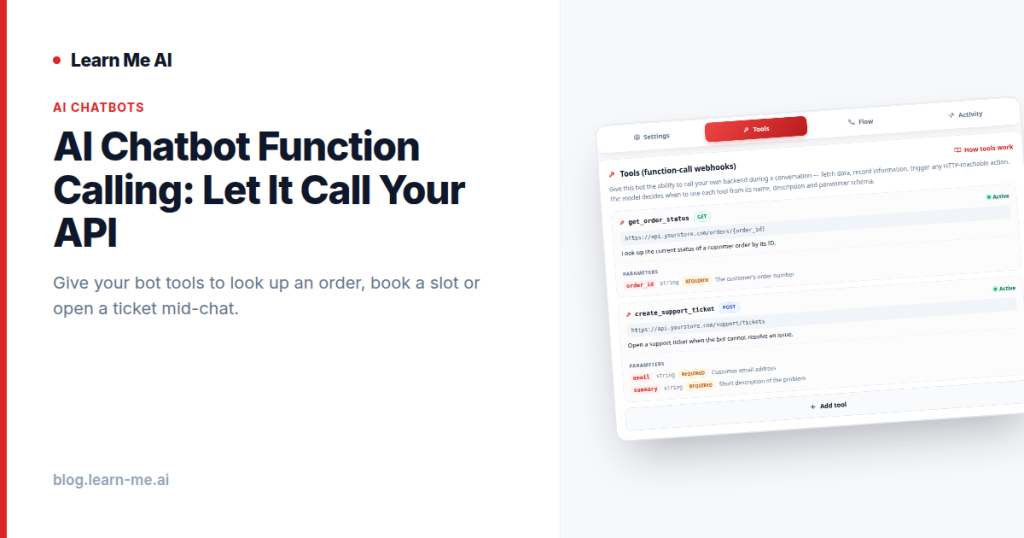
Most chatbots can explain your refund policy, but they can’t actually start a refund. They can describe how to track an order, but they can’t look one up. AI chatbot function calling closes that gap: instead of a bot that only talks, you give it tools — HTTP webhooks it can call mid-conversation to fetch data, record information, or trigger actions on your own backend. The model decides when to use each one, so it can look up an order, book a slot, or open a support ticket right inside the chat. That is the difference between a help-desk script and something that gets work done.
The problem: a chatbot that talks but can’t do anything
A bot trained on your knowledge base is genuinely useful — it answers questions in your own words, around the clock. But a knowledge base is static. It knows what was true when you wrote it, and nothing about this customer, this order, or this moment.
So the conversation hits a wall. “Where’s my order?” becomes “Please email support with your order number.” “Can I book Tuesday at 3?” becomes “Visit our booking page.” Every one of those hand-offs is a place where the user gives up, and the whole point of an in-chat assistant quietly evaporates. The bot has the words but none of the wiring.
How AI chatbot function calling actually works
Function calling — also described as giving a bot tools — is the wiring. You define one or more HTTP webhooks that the bot is allowed to call: an endpoint on your backend, what it does, and what inputs it expects. From then on, the model treats each tool as something it can reach for when the conversation calls for it.
The flow is straightforward, and if you have ever consumed a REST API it will feel familiar:
- You register a tool. Name it, describe what it does in plain language, and point it at an HTTP endpoint with the parameters it needs.
- The model decides when to call it. Mid-conversation, when the user’s request matches what a tool can do, the model fills in the parameters from the dialogue and issues the call. You don’t script “if user says X, call Y” — the model reasons about intent.
- Your backend responds. The webhook hits your API, runs whatever logic you already have, and returns data.
- The bot uses the result. It folds the response back into a natural reply — confirming a booking, reading back an order status, or telling the user a ticket number.
Crucially, this is your API. The tool is just an HTTP call, so it can read from a database, write a record, or kick off any action your backend already supports. The bot doesn’t need new infrastructure — it needs permission to reach the endpoints you already run.
Concrete examples: a chatbot that calls your API
The pattern is the same every time — the model recognizes intent, calls a webhook, and works the answer back into the chat. What changes is the endpoint behind it:
- Look up an order. “Where’s order #4821?” The bot calls your order-status endpoint with the number, gets back a tracking state, and answers — no copy-pasting into a portal.
- Book a slot. “Anything Tuesday afternoon?” The bot checks availability through your scheduling API and confirms the booking, all without leaving the conversation.
- Open a support ticket. When the bot can’t resolve something, it calls your ticketing endpoint, records the details, and hands the user a reference number instead of a dead end.
- Check inventory. “Do you have the large in blue?” A call to your catalog or stock service returns a live answer instead of a stale one from last week’s knowledge base.
Notice the split: the knowledge base handles the stable stuff — policies, how-tos, product explainers — while tools handle the live stuff that changes per user and per minute. Used together, that is a chatbot that actually closes loops.
How to add a tool to your bot
On Learn Me AI, adding a tool is a configuration step, not an engineering project. The shape of it:
- Expose an endpoint. Use an API you already have, or stand up a small webhook that does one thing — return an order, create a booking, file a ticket.
- Register it as a tool on your bot. Give it a clear name and a plain-language description of when it should be used. The description is what the model reads to decide whether a tool fits the moment, so write it for a smart colleague, not a parser.
- Declare the inputs. List the parameters your endpoint expects so the model knows what to pull from the conversation.
- Test it in chat. Ask the bot something that should trigger the tool and watch it make the call. If it fires at the wrong time, tighten the description.
Because each tool is just an HTTP webhook, your backend stays the source of truth. The bot never holds business logic — it routes intent to the endpoints you control. And the same bot you wire up with tools can be embedded on your website or inside a Flutter or React Native app, so the agent behaves the same everywhere it lives.
Why this turns a chatbot into an agent
The word “agent” gets thrown around loosely, but there is a real distinction underneath it. A chatbot responds. An agent acts — it can take steps in the world on the user’s behalf. Function calling is the mechanism that crosses that line. The moment a bot can fetch live data and trigger changes on your backend, it stops being a fancier FAQ and starts being a coworker who can do the task.
And you stay in control of how far it goes. You decide which endpoints exist, what each one is allowed to do, and what data it can touch. Pair tools with a visual conversation flow builder to shape how the bot moves through a conversation, and ground it in real content by letting it chat over your PDFs, audio, web pages, and YouTube. Knowledge for what’s true, tools for what’s live, flows for how it all moves — that’s a complete agent.
Frequently asked questions
What is AI chatbot function calling?
It’s the ability to give a bot function-call tools — HTTP webhooks it can call mid-conversation to fetch data, record information, or trigger actions on your backend. The model decides when to use each one, so it can look up an order, book a slot, or open a ticket without leaving the chat.
Does the bot call my real API?
Yes. A tool is an HTTP call to an endpoint you provide, so it runs against your actual backend and your real data. You choose exactly which endpoints the bot can reach and what each one is allowed to do.
How does the bot know when to call a tool?
The model decides, based on the plain-language description you give each tool and the user’s intent in the conversation. You don’t hard-code triggers — the model matches the request to the right tool and fills in the parameters from the dialogue.
Do I need to be a developer to use AI agent webhooks?
You need an HTTP endpoint to point a tool at, so some backend exists somewhere. But registering the tool, describing it, and declaring its inputs is configuration, not coding — and you can start with a single simple webhook.
Turn your chatbot into an agent
A bot that only talks leaves the real work to your team. Give it tools, and it can fetch, record, and act — right inside the conversation. Build your AI chatbot on Learn Me AI for free, no credit card required, and give it the tools to actually get things done.