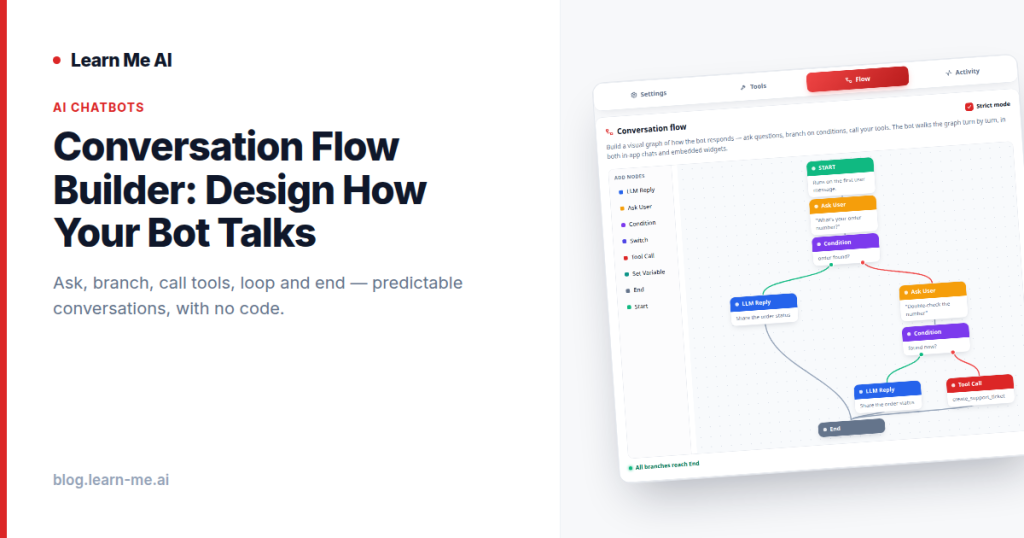
Most AI chatbots improvise. You ask a question, the bot generates a reply, and the conversation goes wherever the model decides. That’s powerful for open-ended help — but it’s the wrong tool when you need a predictable path. A conversation flow builder solves this by letting you design exactly how the conversation goes, turn by turn, instead of hoping the model behaves. With a visual flow, you ask questions, branch on conditions, call your tools, loop, and end — and the bot walks the graph you drew, in both in-app and embedded chats.
This post explains when free-form chat falls short, how a visual flow builder works, and how to decide between guided and open conversations for your use case.
The problem: free-form chat can go off the rails
Open-ended AI chat is fantastic for support and research, where you can’t predict what someone will ask. But that same flexibility becomes a liability for structured tasks. If you’re collecting a lead’s details, qualifying a prospect, or walking someone through onboarding, you need specific information in a specific order — and you need it every time.
With free-form chat, you can nudge the model with instructions, but you can’t guarantee the path. The bot might skip a required question, ask things out of order, or wander into a tangent. For some use cases that’s fine. For others — intake forms, qualification, compliance-sensitive flows — “usually right” isn’t good enough. That’s where guardrails matter, and where a visual chatbot flow earns its place.
How the visual conversation flow builder works
Instead of writing prompts and hoping, you build a graph of nodes. Each node is a step in the conversation, and the bot walks the graph turn by turn. The core building blocks are simple:
- Ask — pose a question and capture the user’s answer before moving on.
- Branch on conditions — send the conversation down different paths depending on what the user said or what your data shows.
- Call your tools — trigger a function-call tool to hit your API, look something up, book a slot, or write to your system mid-conversation.
- Loop — repeat a step until a condition is met, like re-asking until you get a valid email.
- End — close the conversation cleanly once the flow is complete.
Because the flow is visual, you can see the whole conversation at a glance — every question, every fork, every tool call — and edit it without touching code. This is real no-code conversation design: you draw the logic, and the bot follows it. And it works the same whether the chat lives inside the app or is dropped onto your site as an embeddable chatbot for your website.
The flow also pairs with your bot’s knowledge base. When a step needs to answer from your content rather than follow a fixed branch, the bot can draw on documents you’ve trained it on — including the ability to chat with PDFs, audio, web pages, and YouTube — so guided flows stay grounded in your real material.
Free-form vs guided flow: when to use each
Neither approach is universally better — they solve different problems. The right question is what each conversation needs to accomplish.
Use free-form chat when
- Questions are unpredictable and open-ended (general support, research, Q&A).
- You want the bot to answer broadly from a knowledge base.
- The conversation has no required sequence or outcome.
Use a guided flow when
- You need specific information collected in a specific order.
- The path must be the same every time (intake, qualification, compliance).
- You want to call tools at exact moments based on what the user said.
- You prefer guardrails over improvisation.
You don’t have to pick one philosophy for everything. Build guided chatbot flows for the structured parts of your funnel, and let free-form chat handle the rest.
Use cases for guided chatbot flows
- Lead intake: ask for name, need, and contact details in order, validate the email with a loop, then hand off a clean record.
- Qualification: branch on budget, timeline, or company size to route prospects, and call your CRM tool to log the result.
- Guided support: walk a user through a troubleshooting tree, branching on their answers until the issue is resolved or escalated.
- Onboarding: step a new customer through setup, calling tools to provision accounts or fetch their status as you go.
How to build your first flow
- Map the conversation on paper first: what must the bot learn, in what order, and what are the decision points?
- Add ask nodes for each piece of information you need to collect.
- Insert branch nodes at every decision point — different answers, different paths.
- Drop in tool calls where the bot needs to act on your systems. (See how function-call tools let your chatbot use your API.)
- Use loops to re-ask until inputs are valid.
- Add an end node so the bot closes the conversation cleanly.
- Test it in-app, then publish to your embedded chat — the same flow runs in both.
Frequently asked questions
Can the flow call my own tools and APIs?
Yes. A node in the flow can trigger a function-call tool, so the bot can hit your API, look up data, or take an action mid-conversation. The flow decides when the tool fires based on the path the user takes.
Does the guided flow work in embedded chatbots too?
Yes. The bot walks the same graph turn by turn in both in-app and embedded chats, so a flow you design once behaves identically whether it’s inside your app or dropped onto your website.
Do I need to code to build a conversation flow?
No. The flow builder is visual — you place and connect nodes for ask, branch, tool call, loop, and end. It’s no-code conversation design, so you can build and edit the path without writing any logic by hand.
Can I mix free-form chat and guided flows?
You can choose per bot. Use a visual flow when you want guardrails and a predictable path, and rely on free-form chat backed by your knowledge base when conversations are open-ended.
Build your own conversation flow, free
If you’ve ever wished your chatbot followed an exact script instead of improvising, a conversation flow builder gives you that control without code. Design the questions, the branches, the tool calls, and the endings — then watch the bot walk your graph in every chat, in-app and embedded. Get started on the free plan, no credit card required, at Learn Me AI.