 Learn Me AI
Scan Any Book With Your Phone and Chat With It
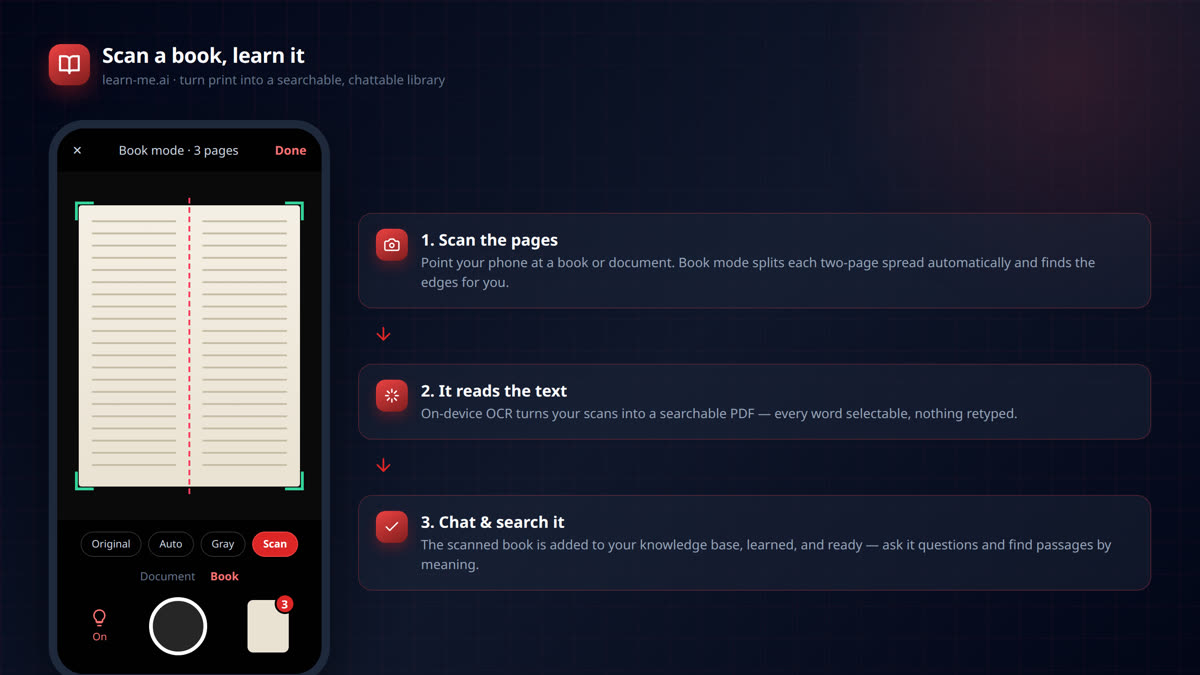
Some of the best sources aren’t files. They’re a textbook chapter, a printed handout, an old manual, a page of notes — paper you can’t drag into a chat window. Until now, using them meant retyping, or awkward photos you can’t search.
learn-me.ai’s Scan fixes that. Point your phone at a book or document, and it becomes a searchable, chattable part of your knowledge base — read, understood, and ready for questions in minutes. No retyping, no fiddling.
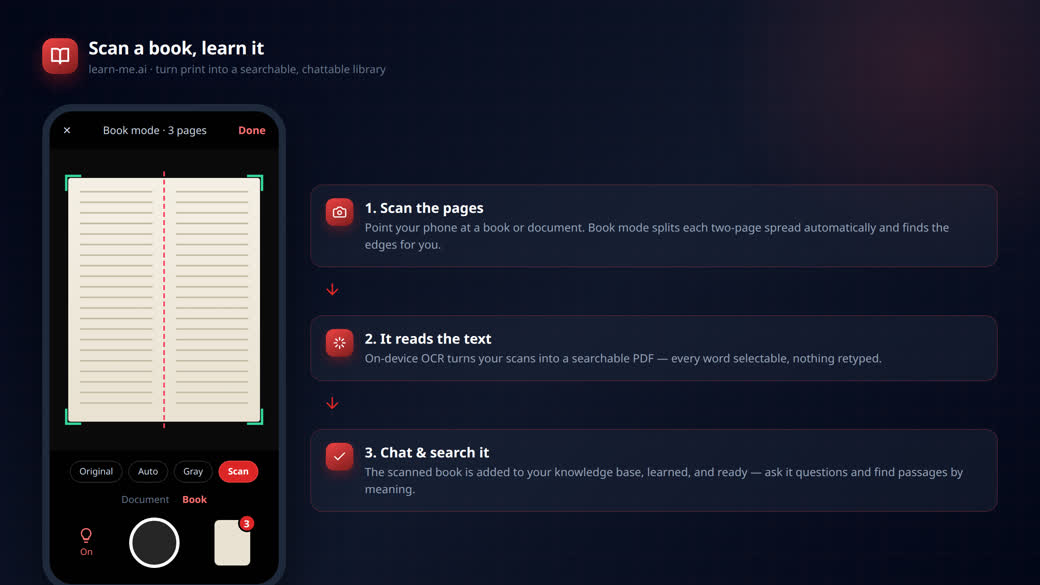
From paper to AI in three steps
1. Scan the pages
Open Scan on your phone and point it at the page. It finds the edges of the document live and straightens the shot for you. Two modes:
- Document — for a single page or handout.
- Book — for an open book. It detects the two-page spread and splits it into two clean pages automatically, so you can scan a whole chapter spread-by-spread without stopping.
Choose an enhancement — Original, Auto, Gray, or a high-contrast Scan look — flip on the torch in dim light, and tap the shutter. Captured pages stack up; you can reorder them, re-crop edges, or rotate any page before saving.
2. It reads the text
When you hit Save & learn, on-device OCR reads every page and builds a searchable PDF — the scanned image with an invisible, correctly-positioned text layer underneath. That means the text is real and selectable, nothing was retyped, and the words are ready for AI to understand.
3. Chat with it and search it
The finished document is added to your chosen knowledge base and learned like any other source. Once it’s ready, you can:
- Chat with it — ask questions and get answers grounded in the scanned pages, with citations.
- Search it by meaning — the scanned book shows up in semantic Search, so you can find exact passages across it and the rest of your library.
A physical book you couldn’t search five minutes ago is now an AI you can interrogate.
Who it’s for
- Students — scan textbook chapters and lecture handouts, then ask the material questions before an exam.
- Researchers — pull an out-of-print book or archival document into a searchable knowledge base.
- Anyone with a shelf of paper — manuals, recipe books, printed reports — turn them into something you can actually ask.
Built to be quick and clean
- Book mode splits spreads for you — scan a chapter without splitting pages by hand.
- Live edge detection and re-croppable corners keep every page straight.
- On-device OCR means the text is real and selectable, not a flat photo.
- Everything lands in the same knowledge base as your other sources, so chat and search work across all of it together.
Try it
Scan is in the learn-me.ai mobile app. Open a knowledge base, tap Scan, and turn your first book into something you can chat with.
Frequently asked questions
How do I turn a physical book into an AI I can chat with?
Open the learn-me.ai app, tap Scan, and photograph the pages (Book mode splits two-page spreads for you). The app reads the text with OCR, builds a searchable PDF, and adds it to your knowledge base — then you can chat with it and search it.
Does it use OCR? Is the text selectable?
Yes. On-device OCR builds a searchable PDF with a real, positioned text layer, so the scanned text is selectable and fully readable by the AI — nothing is retyped.
Can I scan a whole book, not just one page?
Yes. Book mode detects the two-page spread and splits it into two pages automatically, so you can scan chapter after chapter. You can reorder, re-crop, and rotate pages before saving.
What happens after I scan?
The scanned document is uploaded to your chosen knowledge base and learned like any other source. Once it’s ready, you can chat with it and find passages in it via semantic search.
Which devices support scanning?
Scanning is available in the learn-me.ai mobile app on Android and iOS, using your phone’s camera.
Try Learn Me AI free
Turn your PDFs, audio, web pages and YouTube videos into one AI you can chat with — get cited answers and publish the result. No credit card needed.
Get started free →Keep reading
Learn Me AI vs NotebookLM: Which Research Tool Actually Ships Your Work?
Learn Me AI vs NotebookLM — both chat with your sources and cite answers, but Learn Me AI writes and edits full documents, then publishes and exports them. A hands-on comparison.
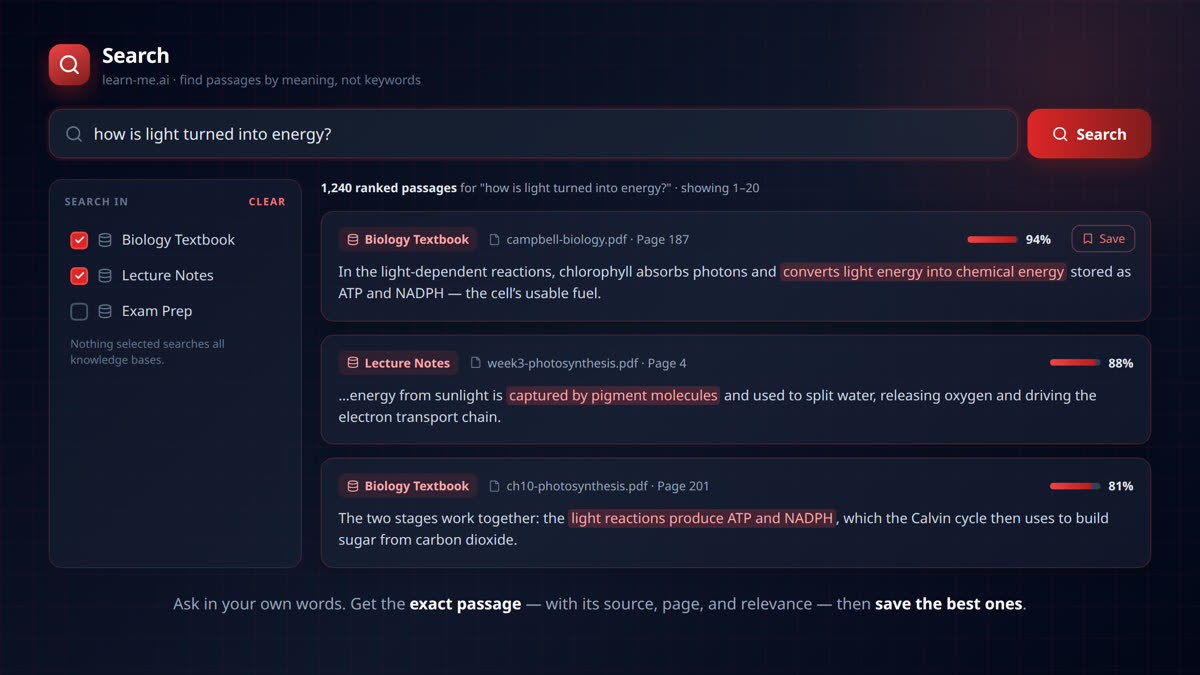
Find the Exact Passage: Semantic Search Across Your Whole Knowledge Base
Search your documents by meaning, not keywords. learn-me.ai finds the exact passage across all your sources — with page numbers, relevance scores, and one-click saving.
Listen to Your Documents: Export Your Work to Audio
Export any document you write in Learn Me AI to a narrated audio file. Turn your research into audio you can listen to on the commute, at the gym, or to proofread by ear. Free to try.