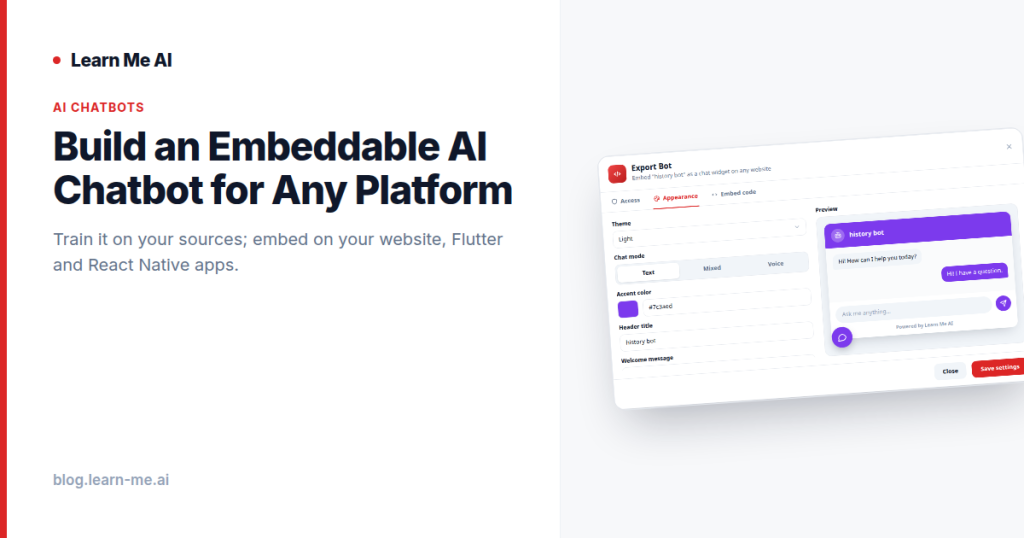
An embeddable AI chatbot sounds simple until you try to build one. You need a model, a way to ground it in your own content so it stops making things up, a streaming backend, a styled widget, and SDKs for every platform you ship on. Most teams spend weeks wiring all of that together before a single visitor asks a question. This guide shows a faster path: train a bot on your knowledge base, style it from a dashboard with no code, and embed it on your website, Flutter, and React Native apps with one snippet — or call it headless through a chat API for a fully custom interface.
The problem: a grounded chatbot from scratch is hard
Bolting a raw language model onto your site is easy. Making it answer accurately about your product, docs, or policies is the hard part. A model that hasn’t been trained on your sources will confidently invent details, and that erodes trust faster than having no chatbot at all.
To do it properly from scratch, you’d need to:
- Ingest and chunk your content, then build a retrieval layer so answers stay grounded in real sources.
- Stand up a backend that streams responses and handles concurrency.
- Build and style a chat widget that matches your brand.
- Maintain separate integrations for web, Flutter, and React Native.
- Add guardrails so the bot cites its sources instead of hallucinating.
That’s a serious engineering project. The alternative is to treat the chatbot as a product you configure rather than a system you build. With Learn Me AI, you train a bot on your own knowledge base, style it, and ship it — with no backend to build and no AI to wire up.
How an embeddable AI chatbot actually works
The whole flow comes down to three steps: train, style, and embed.
1. Train on your knowledge base
Start by giving the bot something to know. You build a knowledge base from your own sources — documents, web pages, PDFs, audio, and more — and the bot answers from that material instead of guessing. This is what makes the difference between a generic assistant and a custom AI chatbot that answers questions accurately for your team or your visitors. Because answers are pulled from your sources, you can get cited, grounded answers without hallucinations rather than plausible-sounding fiction.
2. Style it without code
Once the bot knows your material, you make it look like yours. Theme, accent color, header, welcome message, launcher, and position are all set from the dashboard with a live preview. No CSS required, and no front-end ticket to file — you adjust the look, watch it update, and move on. This is the chatbot widget no code approach: the styling that normally eats developer time becomes a few dashboard settings.
3. Embed it anywhere
With the bot trained and styled, you ship it. The same bot can live on your marketing site, inside your mobile apps, or behind your own custom UI — using the embed path that fits each surface.
The three embed paths (plus a headless API)
You can train a chatbot on your data once and reuse it across every platform. There’s no separate model or content per surface — just a different way to drop it in.
Web: one script tag
For an AI chatbot for your website, you add a single script tag to your page. The launcher and chat window appear styled the way you configured them, and visitors can start chatting immediately. No build step, no framework lock-in — it works on a hand-coded landing page or a CMS-driven site the same way.
Flutter: a drop-in SDK widget
In a Flutter app, you add a drop-in SDK widget. It behaves like any other widget in your tree, so the chatbot becomes part of your app’s UI without you reimplementing chat, streaming, or state management by hand.
React Native: a drop-in component
For React Native, there’s a drop-in component that does the same job. You import it, place it where you want the chat to live, and ship — the heavy lifting stays on the backend you didn’t have to build.
Or go fully headless
If a pre-built widget doesn’t match your design system, go headless. Call the bot through a simple chat API to power your own fully custom interface, with the same endpoint on Web, Flutter, and React Native and streaming responses. You own every pixel of the UI; the bot just answers. If you want the bot to do more than answer — look things up, trigger actions, or call your own services — you can extend it with function-calling tools through the API.
Text, voice, and a hands-free voice agent
An embeddable chatbot doesn’t have to be a text box. You can offer it in three modes depending on how people interact with your product:
- Text — the classic chat window, ideal for support and docs where users want to read and copy answers.
- Mixed text + voice — users type or speak and get answers in kind, useful when hands-free is convenient but not required.
- Hands-free voice agent — a full voice AI agent that listens and replies out loud, for kiosks, in-car, accessibility, or any context where typing isn’t practical.
Because the bot is grounded in your knowledge base, the voice agent stays on-topic and accurate instead of improvising. For a sense of what you can feed it, the same engine can chat with PDFs, audio, web pages, and YouTube — so the sources behind your bot can be as rich as your content library.
Use cases
- Customer support — deflect repetitive questions with accurate, cited answers drawn from your help center, and let visitors chat without signing up.
- Product and developer docs — turn a static documentation site into something people can ask questions of directly.
- Lead generation — put a knowledgeable bot on your landing page that answers pre-sales questions the moment interest is highest.
- Internal team bot — train a bot on internal handbooks and runbooks so your team gets answers without digging through wikis.
For more advanced flows — qualifying a lead, routing a conversation, or branching by intent — you can design the conversation with a visual conversation flow builder instead of writing prompt logic by hand.
How to build and ship yours
- Create a free account — no credit card required.
- Build a knowledge base from your sources so the bot has accurate material to answer from.
- Create a bot trained on that knowledge base.
- Style it from the dashboard — theme, accent color, header, welcome message, launcher, and position — using the live preview.
- Choose a mode: text, mixed text + voice, or a hands-free voice agent.
- Embed it: paste the script tag on your website, add the Flutter widget or React Native component, or call the chat API for a headless custom UI.
Frequently asked questions
Do visitors need an account to use the chatbot?
No. Visitors chat without signing up. They land on your page or open your app and start asking questions right away.
Do I need to build a backend or wire up an AI model?
No backend to build and no AI to wire up. Training, retrieval, streaming, and hosting are handled for you — you configure the bot and embed it.
Can I use the same bot on web and mobile?
Yes. Train and style the bot once, then embed it via the web script tag, the Flutter SDK widget, the React Native component, or the headless chat API — the same endpoint serves all three platforms with streaming responses.
How do I make sure answers are accurate and not made up?
Because the bot answers from your knowledge base rather than general knowledge, responses stay grounded in your sources and can cite where they came from, which keeps hallucinations down.
Ship your embeddable AI chatbot today
Building a grounded, branded, cross-platform chatbot from scratch is a real engineering effort. Configuring one is an afternoon. Train an embeddable AI chatbot on your sources, style it without code, and ship it to your website, Flutter, and React Native apps — as text, voice, or a hands-free voice agent — with one snippet. Start free, with no credit card, at Learn Me AI.